
Home > Tasmeem Magazine > عدد جيتكس ٢٠٠١ > InDesign 1.5 ME: important upgrade to streamline work
 InDesign 1.5 ME: important upgrade to streamline work
by
All the versions of this article: [عربي] [English]
InDesign 1.5 ME: important upgrade to streamline work
In these days, Desktop publishing does not get much of a look-in, especially the packages intended for the professional. The reason is that all of the new ideas in software features are connected, one way or another, with publishing on the Internet not on paper. But paper is still important and in many cases it is still the first medium used to carry information, with publication on the Web or in other electronic form as a secondary consideration.
For example, many organisations need to be able to produce printed manuals while having the option of making them available on the Web or on a CDRom. Until the electronic book becomes widely available, paper is always going to have the advantage of being usable in places where there are no electronic gadgets.
Adobe InDesign 1.5 ME
With this in mind, Adobe launched the first version of InDesign. Many wondered then why Adobe, with a professional-quality DTP product already, should want to add a second. Adobe PageMaker is one of the original DTP packages that started the Mac on its road to dominance of the graphic arts world.
What Adobe really seemed to be worried about was QuarkXPress. QuarkXPress has always managed to stay ahead of PageMaker in the freeformat layout task typified by magazine design. The same happened when these two packages started supporting Arabic design (Arabic localisation of PageMaker and Arabic extensions for QuarkXPress). But here an additional reason could be that the Arabic extensions of QuarkXPress appeared before the localisation of PageMaker thus establishing a solid user base. It is clear then that, by launching InDesign, Adobe was targeting QuarkXPress users.
The most important aspect that differentiate InDesign ME from PageMaker is its support for frames exactly like QuarkXPress (support for frames was one of the most important factors that attracted users to the latter). But frame support is not enough to persuade QuarkXPress users to switch to InDesign ME, especially when one considers that long time users of a particular package are very conservative and tend to avoid new products unless there is a very good reason to change. In fact, InDesign 1.0 ME never succeeded in fulfilling its promise. Many useful features present in QuarkXPress were simply not included in InDesign 1.0 ME.
That is why Adobe launched now InDesign 1.5 ME, which it called the «future of professional publishing». Winsoft has added Arabic support to the product which has become more mature and able to compete with a powerful rival such as QuarkXPress.
The first change existing users will notice is the improved Adobe look and feel. Tools and techniques in InDesign ME are increasingly similar to those in Illustrator and Photoshop, making it easier for users to step from one application to the next without a serious learning curve. Furthurmore, InDesign ME is more fully and smoothly integrated with other Adobe applications. It is very easy to import Illustrator and Photoshop files by placing them (Place command) or dragging and dropping them. InDesign ME supports Photoshop original format preserving any Alpha channel or clipping path they may contain (but not layers as the image is flattened in InDesign) without the need to save these files in an intermediate format. As for Illustrator files in their original format, they are converted to EPS format immediately as they are placed or dragged from the desktop or from an opened Illustrator document.
Much of the functional changes in InDesign 1.5 ME are to do with streamlining the way in which users work. Colours can now be dragged and dropped from the Colours and Swatches palettes onto objects on the page, and the Eyedropper tool allows object styles to be sampled, then applied to multiple other objects. It›s even possible to apply a graphic›s fill colour to text by simply sampling the object, then drag-selecting the text to be changed. This changes the text›s fill colour, even if the fill setting came from a vector graphic. InDesign ME now names new colours according to their component values (CMYK or RGB), which makes managing multiple colours much easier. The drawback, of course, is that individual colours can still be renamed if required.
Many of InDesign ME›s features are not dissimilar to those in XPress, but the program can in no way be mistaken for its rival. Adobe has preview feedback built into most dialog boxes and in use it feels more like Adobe Illustrator. How much this appeals to you depends on how much you like Illustrator, but the result is a tool which is extremely well suited to creative publishing.
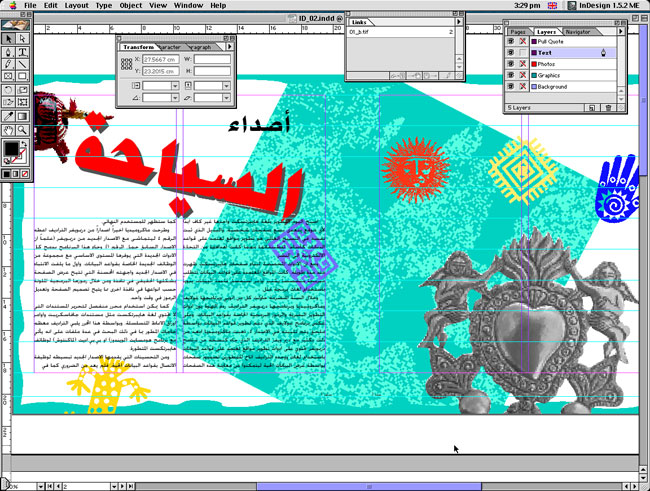
InDesign comes with many new features, such as the ability to fit a box to the picture contents as well as the other way around. It sounds simple but it is extremely useful and only available in An Nashir As Sahafi in its latest releases.
In the hands of a skilled designer, InDesign ME can be used to create particularly stunning fine typography, both at the page and the character level. Less conventional typographers will appreciate now being able to flow text onto any path. But this feature should be used with caution with Arabic text where ligatures could be broken if the path is too complicated. While soft paths do not pose any problem especially that there is full control over how text aligns to the path, and the start and end points of the text can be dragged around the path for precision placement. For many users this, combined with InDesign ME›s other graphics creation features, will significantly reduce the need to ever use a separate graphics package.
Arabic support
These are not all the features provided by InDesign. There are a lot more, but a number of them do not support Arabic texts. Probably the most interesting of the features that do not support Arabic are the automatic inter-character spacing and justification performed using optical rules (which generate a pleasing, slightly more compact setting) and hanging punctuation. Page information in the print dialogue box is also not supported in Arabic.
There›s a simple but extremely useful option to fill a selected frame with dummy text - a variation of the traditional lorem ipsum fake Latin - allowing layouts to be fully mocked up without those distracting searches for a dummy text file. But whatever you do, this feature only fills frames with Latin text, which is not especially useful for Arabic layouts.
File format support
Apart from PageMaker users, InDesign ME targets users of other DTP packages such as An Nashir As Sahafi and the two Arabic flavours of XPress (Arabic XT and Phonix). In a clever move, Adobe provided InDesign with the ability to open Xpress files and Winsoft adapted this ability to open Arabic XT and Phonix files in its ME version.
InDesign ME can open files from these two extensions without any problems. Provided the fonts used in these files are installed in the system (these are special fonts used without the need of an Arabic system because they declare themselves as Latin fonts), InDesign ME can open them exactly as they were designed in Xpress by cleverly transforming XT fonts to display correctly on the pages. But if the fonts used by these files are absent, InDesign ME preserves the layout but uses fonts available in the system, which means that the user has to apply some adjustments to the layout.
As for An Nashir As Sahafi files, InDesign ME does not open them but it can extract and import all the texts that they contain provided the files have been saved in version 6 of An Nashir As Sahafi.
The production front
Many of the features introduced in version 1.5 ME will be of great interest to production staff. There are new built-in trapping features, so trapping of text, InDesign ME-generated graphics and imported bitmaps can all be controlled during output. This answers one of the big criticisms levelled at InDesign by serious print designers.
Multiple printer and PDF export styles can be set up and reused. This ensures the same printer setup settings and PDF export options are used from one job to the next. Another feature - although not new - is that if fonts used in a document are missing from the user›s system, InDesign ME will not only give the usual warning as the document is opened, it will also show any affected type in the layout with a pink highlight. Usefully, the program even allows the missing font to be applied to other type in the layout.
Finally
There is no doubt that InDesign ME provides the designer with all that is needed to produce professional documents. It provides all the features that QuarkXPress provides and more for half the retail price (especially if the latter is used with the Arabic XT extension, which is not sold alone, but with the complete package).
The biggest problem with InDesign ME, however, is not lack of features or capability, it is simply the amount of memory it requires to run. The application itself is happy with a little over 20Mb of RAM, but while it›s running the Mac OS memory usage rockets and it needs at least the same again. If you›re planning to run memory-intensive software, such as Adobe Photoshop, at the same time, you will need more than 128Mb to do anything significant. It is also advisable to use a PowerPC 604-based Mac or better. In contrast, XPress will run acceptably with an old PowerPC 601 Mac with just 24Mb of RAM and An Nashir As Sahafi with even less.
The benefits of InDesign are clear: it is a very powerful DTP environment, which has a lot to offer to both creative professionals and production editors for a very affordable price.
